SMS
GL.iNet cellular routers are equipped with a built-in modem that supports sending and receiving SMS messages after a SIM card is inserted.
Note: This feature only works on GL.iNet 4G/5G models with the original 4G LTE/5G NR module, and is not supported on other modules or any other USB modules.
Supported Models
Supported Models
- GL-E5800 (Mudi 7)
- GL-X2000 (Spitz Plus)
- GL-X3000 (Spitz AX)
- GL-XE3000 (Puli AX)
- GL-E750/E750V2 (Mudi)
- GL-X750/GL-X750V2 (Spitz)
- GL-XE300 (Puli)
- GL-X300B (Collie)
Unsupported Models
- GL-MT6000 (Fortify)
- GL-MG1300 (Mango 2)
- GL-BE14000 (Flint 4)
- GL-BE10000 (Slate 7 Pro)
- GL-MT5000 (Brume 3)
- GL-MT3600BE (Beryl 7)
- GL-BE6500 (Flint 3e)
- GL-BE9300 (Flint 3)
- GL-BE3600 (Slate 7)
- GL-B3000 (Marble)
- GL-MT6000 (Flint 2)
- GL-AX1800 (Flint)
- GL-MT2500/GL-MT2500A (Brume 2)
- GL-MT3000 (Beryl AX)
- GL-AXT1800 (Slate AX)
- GL-SFT1200 (Opal)
- GL-A1300 (Slate Plus)
- GL-MT1300 (Beryl)
- GL-AR750S (Slate)
- GL-MT300N-V2 (Mango)
- GL-AR300M Series (Shadow)
- GL-B1300 (Convexa-B)
- GL-AP1300 (Cirrus)
Quick Setup
Take the GL-X3000 (Spitz AX) as an example.
-
Refer to this link to configure your cellular router first.
-
Log in to the router's web Admin Panel and go to INTERNET -> Cellular. Click the envelope icon in the upper right corner.

-
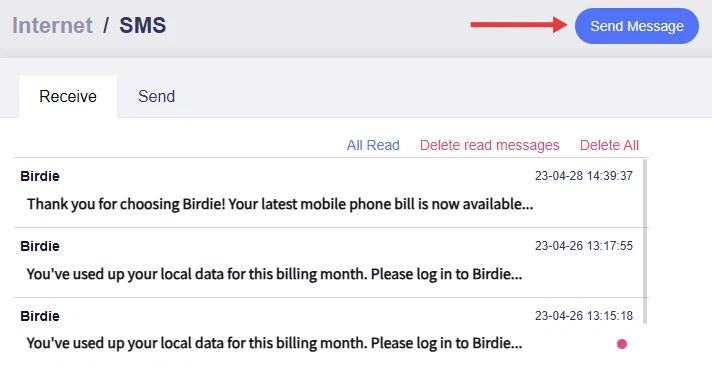
You will be directed to the SMS page, where you can view received messages or compose new ones.

Click a message to view the details.

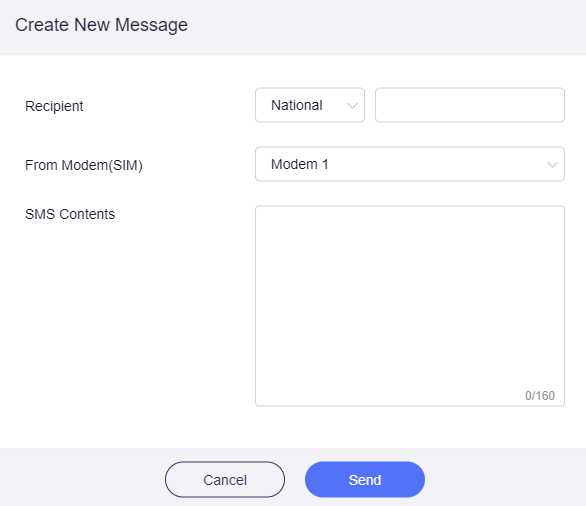
Click the Send Message button in the upper right corner to compose a new message.
-
Recipient
You need to select the international area code and enter the number.
-
From Modem(SIM)
Select which SIM card to send from.
-
SMS Contents
Each SMS can have up to 160 characters.
-
Related Articles
Still have questions? Visit our Community Forum or Contact us.