SMS
GL.iNet cellular routers have a built-in modem that allows sending and receiving SMS messages after inserting a SIM card.
Note: This feature only works on GL.iNet 4G/5G models with the original 4G LTE/5G NR module, and is not supported on other modules or any other USB modules.
Supported models
Supported Models
- GL-X2000 (Spitz Plus)
- GL-X3000 (Spitz AX)
- GL-XE3000 (Puli AX)
- GL-E750/E750V2 (Mudi)
- GL-X750/GL-X750V2 (Spitz)
- GL-XE300 (Puli)
- GL-X300B (Collie)
Unsupported Models
- GL-MT3600BE (Beryl 7)
- GL-BE6500 (Flint 3e)
- GL-BE9300 (Flint 3)
- GL-BE3600 (Slate 7)
- GL-B3000 (Marble)
- GL-MT6000 (Flint2)
- GL-AX1800 (Flint)
- GL-MT2500/GL-MT2500A (Brume 2)
- GL-MT3000 (Beryl AX)
- GL-AXT1800 (Slate AX)
- GL-SFT1200 (Opal)
- GL-A1300 (Slate Plus)
- GL-MT1300 (Beryl)
- GL-AR750S (Slate)
- GL-MT300N-V2 (Mango)
- GL-AR300M Series (Shadow)
- GL-B1300 (Convexa-B)
- GL-AP1300 (Cirrus)
Setup
Take the GL-X3000 (Spitz AX) as an example.
Please refer to this link to set up the SIM card first.
On the left side of web Admin Panel -> INTERNET, Cellular sector.

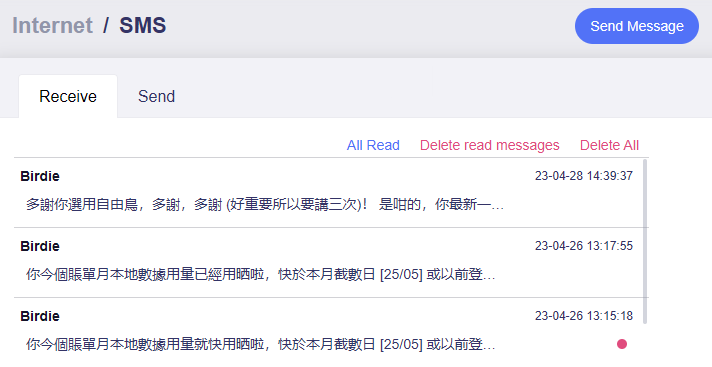

Click on the Send Message button in the upper right corner.
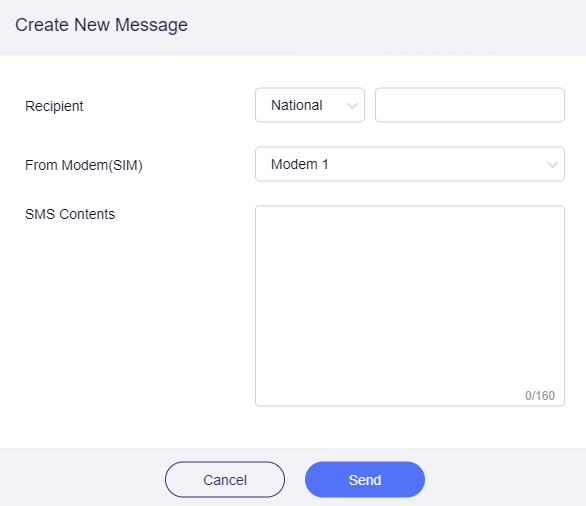
-
Recepient
You need to select the international area code and enter the number.
-
From modem (SIM)
Select which SIM card to send from.
-
SMS Content
Each SMS can have up to 160 characters.
Related Articles
Still have questions? Visit our Community Forum or Contact us.